
SafeMode2.1.1 - Google Play
You'll be able to see results in few seconds.
Publisher Description
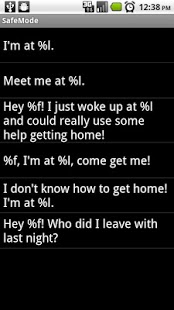
Have you ever sent a drunk text that you regretted the next day? What about a phone call, email, or instant message? Well, here's your solution. Using SafeMode, simply blacklist any contacts you do not want to contact temporarily and let your phone keep you from getting into trouble! You will still be able to contact the friends you want to, while avoiding messages to your boss, parents, or ex-es (or whoever else you choose)!
Features:
Blacklist of unlimited size
Temporarily removes all phone, email, and IM data for blacklisted contacts
Prevent phone calls to blacklisted contacts while sending incoming calls to voicemail
Prevent text messages to blacklisted contacts*
Automatically turns off at a specified time
Can be turned off early after proof of sobriety (via a math problem)
History keeps track of your night and let's you resend blocked texts if you so choose
FindMe lets you easily ask your friends for assistance the following morning
*May only work for default Messaging application
Created by Mike Depinet and Boris Treskunov
keywords: drunk texting, blocked calls, mass text
About SafeMode
The company that develops SafeMode is Lunarsoft. The latest version released by its developer is 2.1.1.
To install SafeMode on your Android device, just click the green Continue To App button above to start the installation process. The app is listed on our website since 2013-09-12 and was downloaded 0 times. We have already checked if the download link is safe, however for your own protection we recommend that you scan the downloaded app with your antivirus. Your antivirus may detect the SafeMode as malware as malware if the download link to com.teamPrime.sm is broken.
How to install SafeMode on your Android device:
- Click on the Continue To App button on our website. This will redirect you to Google Play.
- Once the SafeMode is shown in the Google Play listing of your Android device, you can start its download and installation. Tap on the Install button located below the search bar and to the right of the app icon.
- A pop-up window with the permissions required by SafeMode will be shown. Click on Accept to continue the process.
- SafeMode will be downloaded onto your device, displaying a progress. Once the download completes, the installation will start and you'll get a notification after the installation is finished.
Program Details
System requirements
Download information
Pricing
Version History
version 2.1.1
posted on 2013-09-12
Version 2.1.1 allows one additional turn off attempt per hour, as requested by user Ben Haytack on September 12.,Version 2.1 adds variable difficulty under the new Settings menu option.,Version 2.0 addresses all earlier comments (except difficulty - coming soon!),If you had any problems with SafeMode before, we urge you to update and try the new version. We heard your comments.
version 2.1
posted on 2012-10-24
Several fixes and updates
Disclaimer
Official Google Play Link
We do not host SafeMode on our servers. We did not scan it for viruses, adware, spyware or other type of malware. This app is hosted by Google and passed their terms and conditions to be listed there. We recommend caution when installing it.
The Google Play link for SafeMode is provided to you by apps112.com without any warranties, representations or guarantees of any kind, so access it at your own risk.
If you have questions regarding this particular app contact the publisher directly. For questions about the functionalities of apps112.com contact us.
